- Minimal case. Vite + React https://vitejs.dev/ https://www.robinwieruch.de/vite-create-react-app/
- All-in-one case. Next.js https://nextjs.org/
- SSR-ready case. TanStack Start https://tanstack.com/start
- Another one. React Router Framework https://remix.run/
22 янв. 2026 г.
How to start a React Project

16 июн. 2025 г.
Debug CLS: List DOM elements, their coordinates, and area changes for every layout shift
(new PerformanceObserver((list) => {
const entries = list.getEntriesByType('layout-shift');
entries.forEach((/*LayoutShift*/entry) => {
console.log(entry);
const /*Array<LayoutShiftAttribution>*/sources = entry.sources || [];
const changes = [];
for (const source of sources) {
const { currentRect: cr, previousRect: pr, node } = source;
const dx = cr.x - pr.x;
const dy = cr.y - pr.y;
const ds = cr.width * cr.height - pr.width * pr.height;
changes.push({dx, dy, ds, node});
}
if (changes.length) {
console.table(changes);
}
});
})).observe({ type: 'layout-shift', buffered: true });
28 авг. 2024 г.
23 авг. 2024 г.
State of React memoization in 2023
https://2023.stateofreact.com/en-US/features/
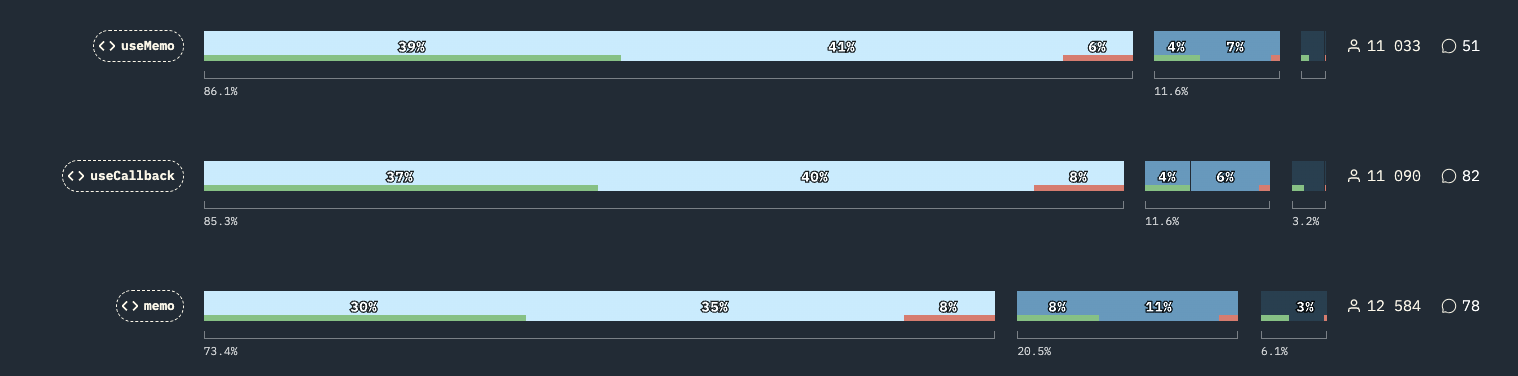
- 86% used useMemo()
- 85% used useCallback()
- 73% used memo()
About 12% of auditory know something about stable links in component props (via useMemo and useCallback) but need to know how to memoize functional components to use those stable links.
23 февр. 2024 г.
Tools for performance measurement (microbenchmarks)
- hyperfine
- https://www.npmjs.com/package/mitata
- https://www.npmjs.com/package/@dynatrace/zakzak
- https://jsperf.app/
- https://jsbench.me/
- https://www.npmjs.com/package/benchmark
- https://github.com/tinylibs/tinybench
- https://github.com/google/tachometer
- https://github.com/stoyan/ticr
- https://www.npmjs.com/package/0x
- https://github.com/dainis/node-gcstats
3 нояб. 2023 г.
Benchmarking bun startup time
Single-line file:
console.log('Hello World')
Benchmark:
hyperfine --warmup 3 'bun test.js' 'node test.js'
Benchmark 1: bun test.js
Time (mean ± σ): 8.9 ms ± 0.6 ms [User: 5.2 ms, System: 3.6 ms]
Range (min … max): 7.5 ms … 11.8 ms 258 runs
Benchmark 2: node test.js
Time (mean ± σ): 24.9 ms ± 1.1 ms [User: 19.7 ms, System: 3.6 ms]
Range (min … max): 23.6 ms … 30.0 ms 111 runs
The difference is only about 20 ms.
ESLint'ing the project with 30000 files:
find . \( -type f -name "*.js" -o -name "*.jsx" -o -name "*.ts" -o -name "*.tsx" \) | wc -l
30623
hyperfine --warmup 3 --ignore-failure 'npx eslint --ext .js,.jsx,.ts,.tsx .' 'bunx eslint --ext .js,.jsx,.ts,.tsx .'
Benchmark 1: npx eslint --ext .js,.jsx,.ts,.tsx .
Time (mean ± σ): 6.896 s ± 0.047 s [User: 15.452 s, System: 0.621 s]
Range (min … max): 6.831 s … 6.980 s 10 runs
Benchmark 2: bunx eslint --ext .js,.jsx,.ts,.tsx .
Time (mean ± σ): 6.776 s ± 0.046 s [User: 15.423 s, System: 0.578 s]
Range (min … max): 6.715 s … 6.849 s 10 runs
The difference is about 100 ms.
console.log('Hello World')
Benchmark:
hyperfine --warmup 3 'bun test.js' 'node test.js'
Benchmark 1: bun test.js
Time (mean ± σ): 8.9 ms ± 0.6 ms [User: 5.2 ms, System: 3.6 ms]
Range (min … max): 7.5 ms … 11.8 ms 258 runs
Benchmark 2: node test.js
Time (mean ± σ): 24.9 ms ± 1.1 ms [User: 19.7 ms, System: 3.6 ms]
Range (min … max): 23.6 ms … 30.0 ms 111 runs
The difference is only about 20 ms.
ESLint'ing the project with 30000 files:
find . \( -type f -name "*.js" -o -name "*.jsx" -o -name "*.ts" -o -name "*.tsx" \) | wc -l
30623
hyperfine --warmup 3 --ignore-failure 'npx eslint --ext .js,.jsx,.ts,.tsx .' 'bunx eslint --ext .js,.jsx,.ts,.tsx .'
Benchmark 1: npx eslint --ext .js,.jsx,.ts,.tsx .
Time (mean ± σ): 6.896 s ± 0.047 s [User: 15.452 s, System: 0.621 s]
Range (min … max): 6.831 s … 6.980 s 10 runs
Benchmark 2: bunx eslint --ext .js,.jsx,.ts,.tsx .
Time (mean ± σ): 6.776 s ± 0.046 s [User: 15.423 s, System: 0.578 s]
Range (min … max): 6.715 s … 6.849 s 10 runs
The difference is about 100 ms.
25 окт. 2023 г.
How to use ESLint + Prettier + VS Code together without conflicts
- Install eslint, prettier, eslint-plugin-prettier, eslint-config-prettier
- Update eslintrc file to look like this:
extends: [
'eslint:recommended',
'plugin:react/recommended', // if react is used
'plugin:react-hooks/recommended', // if react is used
'plugin:@typescript-eslint/recommended', // if ts
'plugin:prettier/recommended'
],
plugins: ['prettier', 'react', 'react-hooks', '@typescript-eslint'],
With this setup ESLint starts to use Prettier and its rules for code style checks and autofixes.
Moreover, now you don't need two separate commands to run ESLint and Prettier, they both will run with a single command eslint --fix.
Additional steps for VS Code:
- Install the "Prettier - Code formatter" extension
- Go to Settings and set the "Editor: Default formatter" to "Prettier - Code formatter"
- Enable "Editor: Format On Save"
Подписаться на:
Комментарии (Atom)